
I am planning to use Quarto for more polished blog and technical documentation. I have the following reasons why I didn’t go for Quartz:
- I often want to show rendered outputs of code snippets which required me to either take screenshots or copy the output logs. It is okay for most of part but I wanted close proximity between code, output, and documentation for reproducibility purposes. It is very close to idea where I want to make Jupyter notebook kind of experience but also very ready to publish
- I want to use VS Code for more technical documentation. Unlike Obsidian, I can install more advanced plugins like Jupyter, Python, and more.
- There is Quarto extension for marimo as well.
What Is Quarto
An open-source scientific and technical publishing system
Quarto .qmd files contain a combination of Markdown and executable code cells.
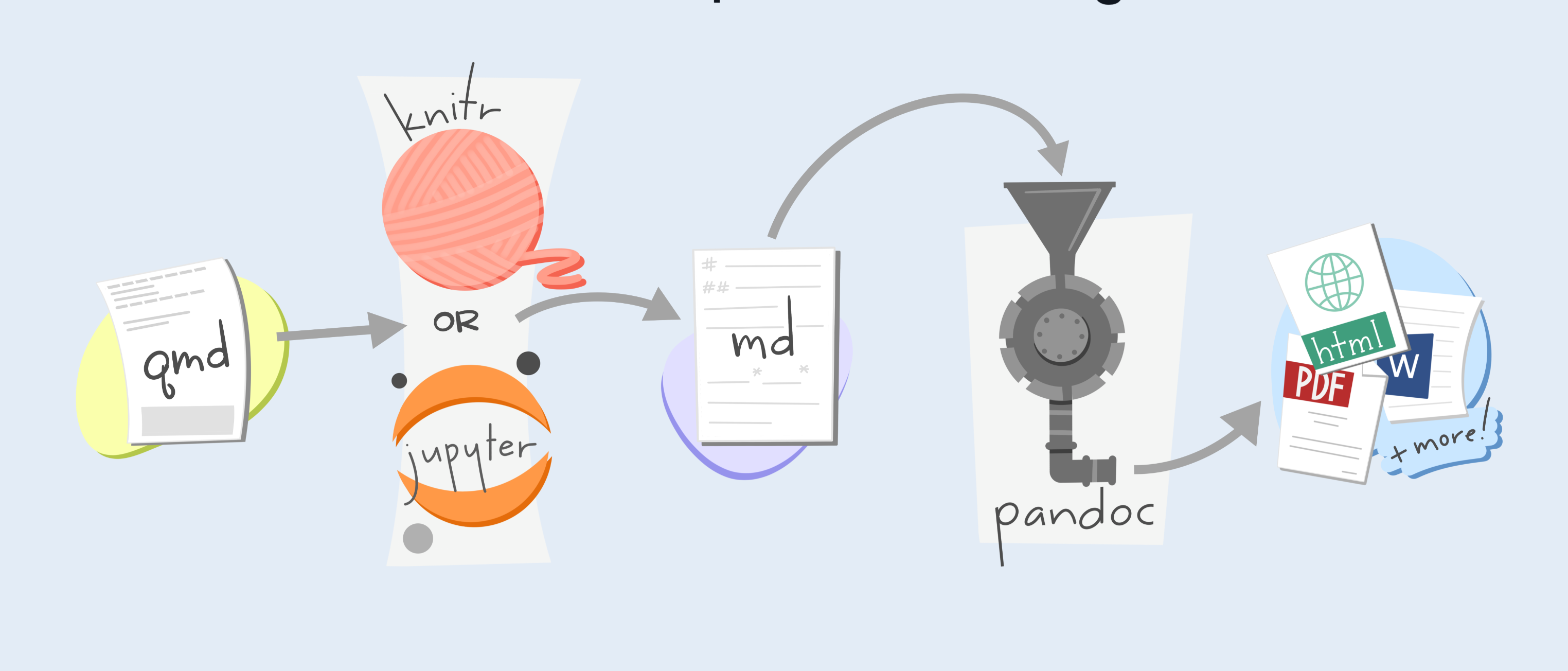
Source: https://mine.quarto.pub/hello-quarto/#/quarto-cli-orchestrates-each-step-of-rendering
My Workflow
Quarto Codebase
- First of all, we will need to install the Quarto CLI. I used Homebrew to install
brew install --cask quarto. You can read how to get started here. - Next, we need to set up the necessary tooling for the editor of choice. I went for VS Code.
- I also created my own blog repo
quarto-repoand ran this command to scaffold basic blog structurequarto create project blog quarto-blog.
We can preview the newly created blog using:
cd quarto-blog
quarto preview
Remember to push local repository after
git initand initial commit to remotequarto-repo.
Mostly followed this guide and this guide for setting up blog website.
Well, by now, I have done a lot of customizations using CSS and partial templates. No guide to follow, just shipping good looking theme at inference speed of Codex by OpenAI.
Hosting
For hosting, I am again using Cloudflare Pages. I installed wrangler and manually rendering and deploying Quarto assets. CI / CD wasn’t working for some reason. Simply, pushing changes to main and then deploying it using Justfile. Quarto assets has to be under _site folder.
cf-deploy:
	@wrangler whoami >/dev/null 2>&1 || wrangler login
	quarto render
	wrangler pages deploy _site --project-name="quarto-blog" --branch "main"