
The effectiveness of a RAG system largely depends on the quality of context retrieved from vector stores, as this context guides the LLM in generating accurate and relevant responses.
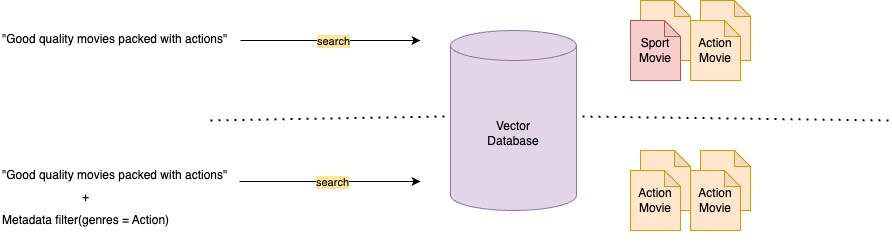
A key method to improve context relevance is metadata filtering, which refines search results by pre-filtering the vector store using custom metadata attributes. This narrows the search space to the most relevant chunks, reduces noise, and helps the LLM focus on high-quality context. Source
What Is Metadata Filtering?
Metadata filtering refines search results by pre-filtering the vector store using custom metadata attributes. This narrows the search space to the most relevant documents, reducing noise and irrelevant content. For a detailed overview, see Amazon Bedrock Knowledge Bases now supports metadata filtering to improve retrieval accuracy.
To improve a RAG system’s effectiveness, focus on three key metrics and how metadata filtering enhances each:
- Answer relevancy–Measures how well the answer addresses the query. Metadata filtering improves this by retrieving more relevant context.
- Context recall–Indicates how much relevant information is retrieved. Filtering boosts recall by better identifying pertinent documents.
- Context precision–Assesses the accuracy of the retrieved content. Filtering reduces noise by excluding irrelevant or loosely related data.
This feature allows you to attach a custom metadata file (up to 10 KB) to each document in the knowledge base. During retrieval, you can apply filters that instruct the vector store to first pre-filter based on this metadata, and then perform the semantic search—resulting in more targeted and relevant results.
To use metadata filtering, provide metadata files alongside your source documents, using the same filename with a .metadata.json suffix. Metadata values can be strings, numbers, or booleans. Here’s an example of a metadata file:
{
  "metadataAttributes": {
    "tag": "project EVE",
    "year": 2016,
    "team": "ninjas"
  }
}
The metadata filtering feature is available for all supported vector stores.
Intelligent Metadata Filters Extraction
We can send the user query to a foundational model (LLM) to extract meaningful and complex attributes, which can then be used as metadata filters to narrow the search space within the knowledge base. This enhances the relevance of the results by limiting the number of documents considered. These metadata filters can be extracted using function calling within the LLM. Read more in this blog post: https://aws.amazon.com/blogs/machine-learning/streamline-rag-applications-with-intelligent-metadata-filtering-using-amazon-bedrock.
Query with Metadata Filtering
Here’s how we can construct metadata filters for retrieval using different logical conditions:
# Single filter: genres = "Strategy"
single_filter = {
  "equals": {
    "key": "genres",
    "value": "Strategy"
  }
}

# Group filter: genres = "Strategy" AND year >= 2023
one_group_filter = {
  "andAll": [
    {
      "equals": {
        "key": "genres",
        "value": "Strategy"
      }
    },
    {
      "GreaterThanOrEquals": {
        "key": "year",
        "value": 2023
      }
    }
  ]
}

# Combined group filter: (genres = "Strategy" AND year >= 2023) OR score >= 9
two_group_filter = {
  "orAll": [
    {
      "andAll": [
        {
          "equals": {
            "key": "genres",
            "value": "Strategy"
          }
        },
        {
          "GreaterThanOrEquals": {
            "key": "year",
            "value": 2023
          }
        }
      ]
    },
    {
      "GreaterThanOrEquals": {
        "key": "score",
        "value": 9
      }
    }
  ]
}